
CI/CD (Continuous Integration / Continuous Delivery)
Code storage and delivery
The first and most important step toward CI/CD is having one central place where code is stored and shared. Code is the main result of software development, so it needs a clear home. This home should be a shared space that everyone on the engineering team knows, uses, and trusts every day. A code repository is basically like Google Drive or Dropbox storage, but for developers to work on code together. If your organization doesn’t already have one, setting up a code repository ( aka code storage ) is the best place to start when building continuous delivery.
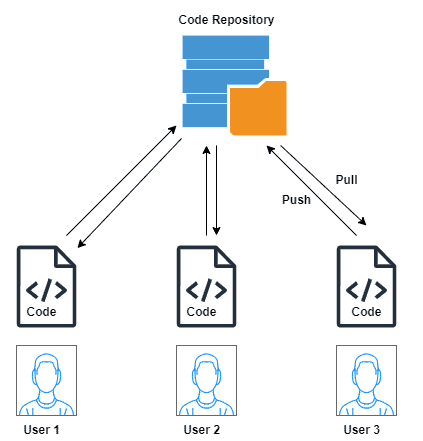
Most teams use code repositories from providers like GitHub, GitLab, or Bitbucket. These platforms offer strong free plans that are usually enough for a long time, and you only need to pay if you want extra features later. Before picking one, it’s a good idea to ask the team if they already have experience with or prefer a specific platform.
Most code repository providers, like GitHub, GitLab, and Bitbucket, also include tools for building continuous delivery pipelines. A pipeline is a series of steps that run automatically when something happens, such as a code commit, a schedule, or a manual trigger.
Common CI/CD keywords:
Code repository → Storage unit / shared drive
A central place where everyone stores their code.Commit → Saving your work
Like clicking “save” with a message explaining what you changed.Branch → Side road
A separate version to try custom code without affecting the main road.Main / Master branch → Main road
The official code, the trusted version everyone relies on.Pull request / Merge request → Review request
Asking others to check your work before it is added into the official code.CI (Continuous Integration) → Quality check line
Automatically checking that everything still works when new code are added.CD (Continuous Delivery / Deployment) → Shipping process
Getting the finished software ready to send or actually sending it.Pipeline → Assembly line
A set of steps that build, test, and prepare the software.Automated tests → Inspection tools
Bots that helps check for defects.Environment (dev, staging, prod) → Different rooms
Places to test, simulate and release the final software.Deployment → Launching it
Making it available for public to use.Rollback → Undo button
Going back to a previous version if something goes wrong.